One file that looks correct on a website does not finish asset management. Future edits, other computers, small sizes and dark backgrounds create different needs. I inspected actual asset structures and used new anonymous lettering to make those roles visible.
Give the editable master and delivery file distinct roles
An editable master is convenient when lettering needs revision. A delivery asset may need to preserve its appearance on another computer without relying on an installed font. I reread the current SVG structures in a branding archive to explain why both roles were retained. Replacing every master with a single outlined export can discard information needed for the next change.
The inspected folder contained thirty-eight root SVGs. Thirteen files identified and checked as outline variants contained no text elements; thirteen retained editable text. Those counts describe current file structure. They do not establish new print approval or trademark clearance for every asset. No original customer logo has been transferred to this page.
Preserve geometry while retaining the meaning elsewhere
An outlined asset stores glyph shapes as paths. Those paths travel even when the original font is unavailable. They no longer carry all the editing meaning of a string, however. Retain the descriptive alternative text, title and original lettering separately. A website integration needs that explanation in addition to visible geometry.
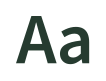
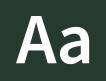
The new example uses only the diagnostic letters Aa, with no company identity. It reads the chosen installed font’s outlines to create a simple SVG pair. Font software is not included in the downloadable output. The editable master references a family name and may select a fallback elsewhere. Matching its appearance to the outline requires the appropriate font conditions; the pair makes that dependency explicit.
Review weight and background at small sizes
A vector retains its paths when enlarged, but that alone does not settle readability at a very small size. Shrinking the new example led me to reconsider relying on a variable font’s default weight. The generator now applies a requested wght value within the available axis and records the actual weight for a static font. It records the applied condition rather than merely giving the file a bold-sounding name.
I inspected rendered outline previews at widths of32,64 and256pixels, plus white lettering on a dark background. I saw no obvious clipping in those local previews. They do not replace approval of a small icon, actual browser rendering or printed output. Distinct light-background and dark-background assets make the intended combination easier to select.
State the conversion boundary in the code
This generator accepts simple Latin letters and spaces. It calculates glyph bounds, adds padding and assigns the same viewBox to the two outputs. Missing glyphs cause failure, and existing output files are preserved. Even a small module benefits from rejecting an unsupported condition rather than quietly returning an empty or misleading graphic.
The code below extracts the geometry core from the generator: glyph paths, dimensions and positions are returned for the SVG serialization step. It is not a complete typesetter for kerning, ligatures or complex shaping. The example should not be expanded indiscriminately to Korean or connected scripts. Actual branding needs suitable shaping, license review and receiving print conditions. Its role here is a bounded diagnostic asset plan.
Explore the implementation
Core glyph geometry and viewBox planner
"""Create a simple Latin diagnostic text master and glyph-outline SVG pair.

Uses an explicitly selected, licensed font. No kerning, ligatures or complex-script
shaping. Font software is not copied into output. Existing files are preserved.
"""
import argparse,hashlib,html,json,math,re
from pathlib import Path
from xml.etree import ElementTree as ET
from fontTools.pens.boundsPen import BoundsPen
from fontTools.pens.svgPathPen import SVGPathPen
from fontTools.ttLib import TTFont
from fontTools.varLib.instancer import instantiateVariableFont

def glyph_geometry(font_path,text='Aa',size=64,padding=16,weight=600):
    if not isinstance(text,str) or not text.strip() or len(text)>48 or not re.fullmatch(r'[A-Za-z ]+',text):
        raise ValueError('One to48 simple Latin letters/spaces required')
    if not math.isfinite(size) or size<=0 or not math.isfinite(padding) or padding<0:
        raise ValueError('Positive size and nonnegative padding required')
    with TTFont(font_path) as font:
        if 'fvar' in font and any(axis.axisTag=='wght' for axis in font['fvar'].axes):
            axis=next(axis for axis in font['fvar'].axes if axis.axisTag=='wght')
            if not math.isfinite(weight) or not axis.minValue<=weight<=axis.maxValue:raise ValueError('Weight outside the selected font axis')
            font=instantiateVariableFont(font,{'wght':weight},inplace=True)
            applied_weight=weight
        else:applied_weight=font['OS/2'].usWeightClass if 'OS/2' in font else 400
        glyphs=font.getGlyphSet();cmap=font.getBestCmap();units=font['head'].unitsPerEm;scale=size/units
        family=font['name'].getDebugName(1) or 'serif';cursor=0;parts=[];bounds=[]
        for char in text:
            name=cmap.get(ord(char))
            if not name:raise ValueError('Selected font lacks a requested glyph')
            pen=SVGPathPen(glyphs);glyphs[name].draw(pen)
            bbox=BoundsPen(glyphs);glyphs[name].draw(bbox)
            if bbox.bounds:
                left,bottom,right,top=bbox.bounds;bounds.append((left+cursor,bottom,right+cursor,top));parts.append((cursor,pen.getCommands()))
            cursor+=font['hmtx'].metrics[name][0]
        if not bounds:raise ValueError('No visible glyph outline')
        minimum=min(x[0] for x in bounds);maximum=max(x[2] for x in bounds);bottom=min(x[1] for x in bounds);top=max(x[3] for x in bounds)
        width=math.ceil((maximum-minimum)*scale+2*padding);height=math.ceil((top-bottom)*scale+2*padding)
        origin=padding-minimum*scale;baseline=padding+top*scale
        return {"viewBox": [0,0,width,height], "family": family, "weight": applied_weight, "scale": scale, "baseline": baseline, "origin": origin, "paths": [{"x": x, "d": commands} for x,commands in parts]}
Retain inspection conditions with the files
Similar-looking assets can serve different purposes: editing, delivery, light backgrounds or dark backgrounds. The generation record retains the chosen font hash, applied weight, viewBox and path count. Those conditions help identify what needs renewed inspection after a file changes. Counting the original archive does not prove that every asset received identical approval.
Eight checks covered the new generator’s structure and input conditions, and I visually inspected four new previews. The downloads below are the newly authored anonymous editable and outlined examples. They contain neither original customer files nor font software. Preserve the editable master, create the required delivery variant and retain the size and background conditions actually reviewed.
Explore the implementation output in a video and guide
These neutral Aa outputs compare the outlined master,a small delivery asset and a dark-background asset. The video explains actual output files;it is not a website screen recording. Video seeking and PDF viewer interaction require a separate browser check.